.avif)
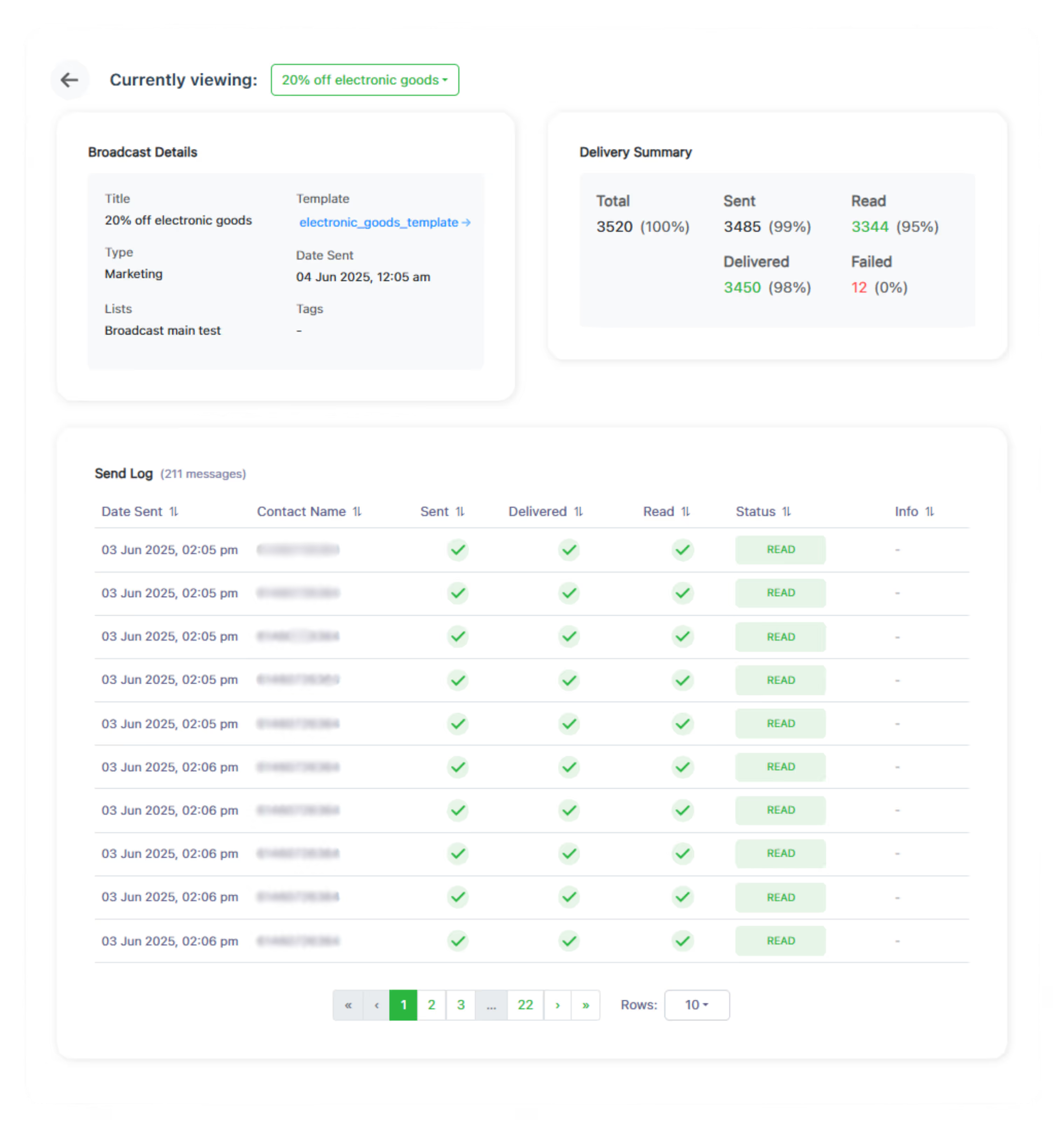
Real-time broadcast delivery reports provide immediate visibility into campaign performance, this allows instant resending of failed or delayed messages to maximize campaign reach.

WhatsApp broadcast analytics is the delivery story of a campaign, told per recipient: who was targeted, whose message was sent, whose arrived, who opened it, and exactly which sends failed and why.
hitlchat tracks that funnel in real time for every campaign, pairing headline percentages with a contact-by-contact send log you can filter, retry, and export.
Bulk sending without tracking is guesswork with extra steps. The moment you can see the funnel, you can answer the questions that actually improve campaigns:
Every campaign becomes a measurement of your list quality and your message, not just a send button.
Results flow in as WhatsApp confirms each stage:
Sent, Delivered, Read is a funnel — each stage you lose is a specific, fixable problem, not a mystery.
What changes when the delivery data is one click from the send.
Statuses stream in live, so a problem send is visible in minutes, not on next week's report.
Failed sends carry a reason and a retry button, so a hiccup doesn't quietly cost you part of your audience.
Repeat failures identify dead numbers to prune, protecting both results and your sender reputation.
Read rates across campaigns show which templates and send times actually earn attention, one iteration at a time.
Exports turn a campaign into a shareable file for clients, managers, or your own spreadsheet rituals.
Each number in the delivery funnel diagnoses something different. Here is what a weak stage is telling you, and the move that fixes it.
| Metric | What it tells you | The move |
|---|---|---|
| Total | How many contacts the campaign targeted after list and tag resolution | Sanity-check your segment before judging anything downstream |
| Sent | Messages successfully handed to WhatsApp; a gap here means submission failures | Open the send log, read the failure reasons, fix, and retry |
| Delivered | Messages that reached a device; the gap from Sent is usually dead or unreachable numbers | Prune repeat non-deliverers to keep the list honest |
| Read | Blue-tick opens (Business API campaigns); your message and timing scoreboard | Iterate the template and send time, then compare against your own past campaigns |
| Failed | Sends that never made it, each with a reason in the log | Retry the fixable ones; remove the permanently invalid |
The same funnel, put to work six different ways.
Minutes after sending, filter the log to Failed, retry what's fixable, and know the true reach of the campaign before lunch.
Two campaigns, two templates, same list: the read rates settle the argument about which opening line works.
Schedule the same style of campaign at different hours and let delivered-to-read gaps reveal when your audience actually looks at their phone.
A quarterly pass over repeat failures keeps segments honest, so future percentages describe real people rather than dead numbers.
Export a campaign report per client and the monthly retainer conversation comes with receipts.
Analytics measures the delivery; the replies themselves land in the shared team inbox where agents and bots turn interest into orders.
Screen-by-screen detail lives in the guides: Understanding Broadcast Analytics · Sending Broadcast Campaigns · Creating Message Templates.
Teams that improve every send tend to run some version of this checklist after each campaign:
Fifteen campaigns later, that routine has quietly built you a clean list, a proven template library, and a defensible send time.
Everything you need to know about WhatsApp broadcast analytics.
A live delivery funnel (Total, Sent, Delivered, Read, Failed) shown as counts and percentages, plus a per-recipient send log with each contact's current status and any failure reason.
No. Read (blue-tick) tracking applies to WhatsApp Business API campaigns. On QR-connected sends, treat Delivered as the headline metric.
The message left successfully but never reached a device, which most often points to inactive or invalid numbers. Recurring offenders are prime candidates to prune from your lists.
The honest answer: the one better than your last campaign. Audience, country, and message type swing the numbers so much that your own history is a far better benchmark than any industry average.
Yes. The Message Send Log lists every recipient individually, and it can be filtered, so checking whether a particular customer received the campaign takes seconds.
Once it actually sends. Until then there is nothing to report, so analytics stays unavailable for campaigns still waiting on their scheduled time.
No. Retry targets the failed sends only; contacts whose messages succeeded are left alone.
Switch between campaigns with the analytics dropdown, or export both reports and line them up side by side in a spreadsheet.
Replies flow into the shared team inbox as live conversations rather than a chart, which is where your team (or your chatbot) converts the interest the campaign generated.
Yes, indirectly and effectively: pruning repeat failures and watching delivery health keeps you sending to engaged, valid numbers, which is the core of staying in WhatsApp's good books.
Create Your Free Account Now

No credit card required
%20(1).avif)

